Webflow EU Hosting: What European Companies Get, What Is Missing, and Who Qualifies
Last checked against Webflow's help center, updates page and legal pages on 21 November 2026. This is a product explainer, not legal advice. Check the current terms with Webflow and your DPO before you commit.
The short version: Since 17 November 2026, Webflow can run your site on a separate deployment in the EU, with CMS content, assets, form submissions, backups, localization data and Ecommerce data stored at rest in Ireland, with failover in Frankfurt. It is only available on specific Enterprise plans, it has its own login, and several Webflow products do not work with it: Marketplace apps, Analyze, Optimize, Campaigns and AEO. Some data still leaves the EU, through the CDN, through subprocessors and through support staff access. If you are on a self-serve plan, nothing has changed for you. Your data is still stored in the US under Webflow's Data Processing Addendum and the EU-US Data Privacy Framework, and that remains a lawful setup for most marketing sites.
Who this is for: marketing leads and operations people at European companies who have been asked by legal, procurement or a client where their website data lives. Also anyone who read an older article saying Webflow has no EU data residency. That was true until this week.
What changed on 17 November 2026
Until this month, the answer to "can Webflow store our data in Europe" was no. Webflow's own privacy FAQ states that it stores customer and end-user data in the United States, where the company is based, and uses US-based subprocessors. Guides written in 2024 and 2025 by compliance vendors repeat that, and they still rank in Google. Treat anything published before mid-November 2026 as out of date on this point.
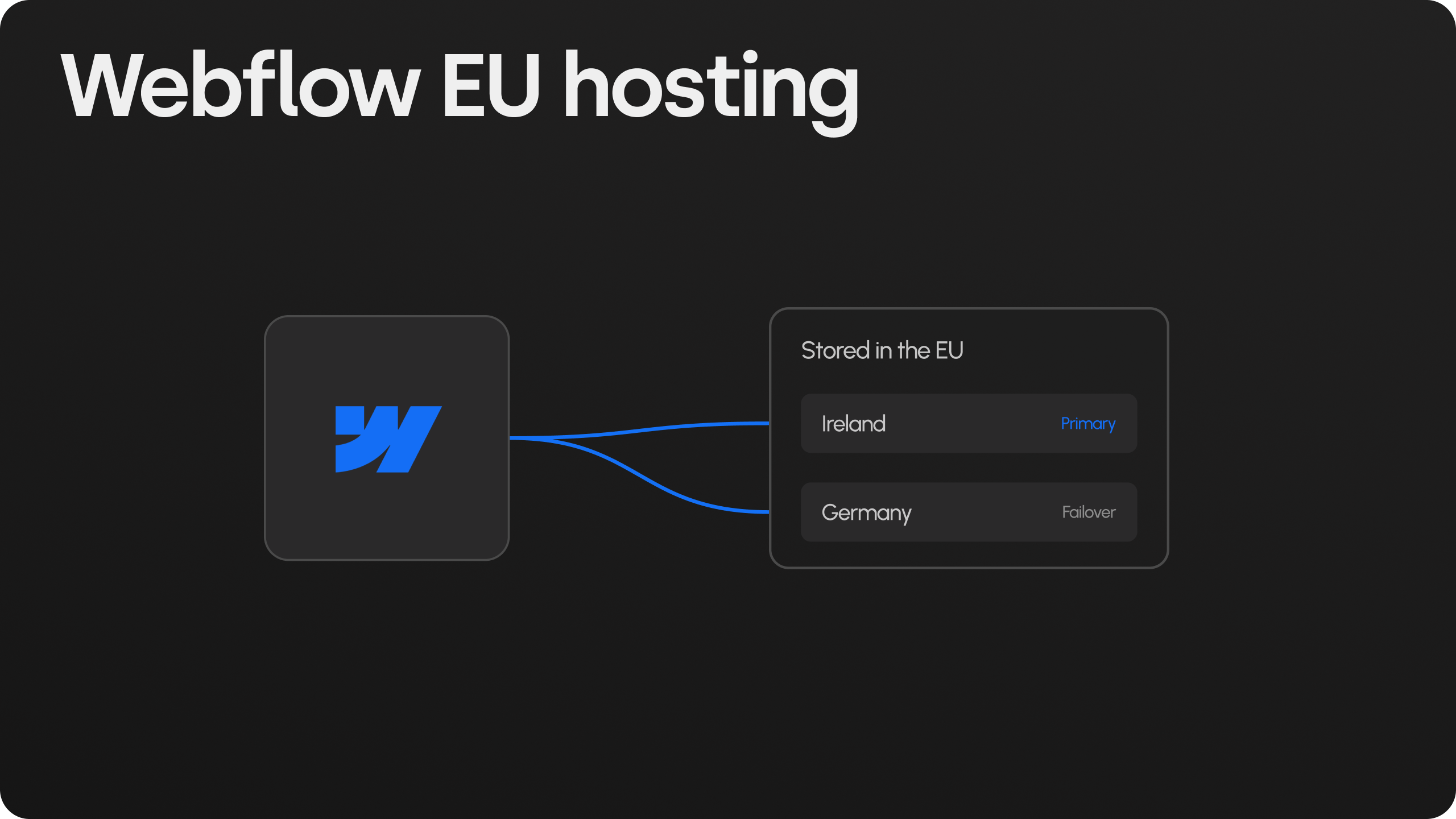
On 17 November 2026, Webflow announced EU Hosting (Webflow Updates). The one-line description from Webflow: your site runs on a separate Webflow deployment in the EU, with its own databases, backups and login, and site data is stored at rest in the EU.
"Separate deployment" is the important phrase. This is not a setting on your existing site. It is a second Webflow, running in Europe, with its own URL to log in to.
What is stored in the EU
From the EU Hosting help article, the EU environment runs on AWS in two regions:
The data stored at rest in the EU:
- CMS content
- Site assets (images, files, documents)
- Form submissions
- Backups
- Webflow Localize data (see our multi-language Webflow guide)
- Webflow Ecommerce data
What runs in the EU environment:
- Hosting and publishing
- The Designer, with a separate EU login at eu.webflow.com
- EU versions of the Webflow APIs and the Webflow MCP server
- Webflow Cloud EU
- Site activity logs, and bandwidth metering with a usage dashboard
For a marketing team, the two items that usually matter to legal are form submissions and CMS content. Form submissions are personal data by definition: names, emails, company, the message field. CMS content can be too, if you publish team pages, customer stories with names, or job applications. Both now stay in Ireland.
What is not included
This is the part most announcements skip. Webflow lists these as not available with EU Hosting:
The Marketplace exclusion is the one to think hardest about. The Webflow app ecosystem has grown a lot in 2026, and many teams rely on apps for cookie consent, forms, and content tooling. On EU Hosting you go back to script-based integrations. That is workable, but check your current app list before you sign.
What still leaves the EU
Webflow is clear that EU Hosting controls where data is stored at rest, not everything that happens to it. Three things still involve processing outside the EU:
- CDN caching. Published pages and assets are cached by the content delivery network close to the visitor. A visitor in Toronto gets your page from a Toronto edge node. This is how every CDN works and it is what makes the site fast. The copies are of your published site, so for most marketing sites this is public content, not personal data.
- Subprocessors. Some features depend on third-party services that process data outside the EU. Webflow's subprocessors list was updated on 17 November 2026, the same day as the launch. AWS and MongoDB are listed as US and EU. Mailjet, which handles transactional email, is EU. Cloudflare is global. Most of the rest, including monitoring, AI services, billing, data warehouse and support tooling, are US. If a feature uses one of those services, data for that feature can be processed in the US.
- Support and operations access. Webflow staff outside the EU may access data to provide support, maintain the service, or respond to security issues. In Webflow's words, EU Hosting governs where supported data is stored, not who can access it.
None of this is unusual. It is the same shape as EU regions from most US SaaS vendors. But if someone in your company has promised "no data ever leaves the EU", that promise does not match what Webflow offers, and you should correct it before an audit does.
Who qualifies
EU Hosting is available on specific Enterprise plans. You do not need to be a European company; Webflow says it is available to eligible Enterprise customers regardless of location. There is no published price. You get it by talking to Webflow sales or your account team.
Two paths:
- New Workspace. Webflow configures your Workspace for EU Hosting and you sign in at eu.webflow.com.
- Existing Enterprise customer. You may be eligible to migrate. Webflow reviews each migration case by case and arranges it with you. There is no self-serve migration button.
If you are on Basic, Premium, or the Team plan, this product is not available to you. The Team plan sits above self-serve and is priced on an annual contract, but EU Hosting is listed under Enterprise only.
Is it worth moving to Enterprise for this?
Our honest view, having built and maintained Webflow sites for European B2B companies for several years: for most marketing websites, no. For a specific set of companies, yes, and they usually already know who they are.
Move if:
- Your legal or compliance team has a documented requirement for EU data storage at rest. Regulated sectors, public sector suppliers, and companies whose own customer contracts promise EU storage are the usual cases.
- Your website collects more than contact form data. Gated content with detailed forms, event registrations, job applications with CVs, customer portals with Webflow Cloud. The more personal data lands in Webflow, the stronger the case.
- You are already close to Enterprise for other reasons: SSO, custom roles, audit logs, the uptime SLA, the WAF. EU Hosting then becomes one more line in a contract you were going to sign anyway. We cover the full Enterprise security list in Webflow security review for B2B buyers.
- A deal depends on it. If a prospect's procurement team will not sign without EU storage, the Enterprise cost is a sales cost, not an IT cost.
Do not move only for this if:
- Your site is a brochure site with a contact form, and your current setup already runs under Webflow's DPA with Standard Contractual Clauses and the Data Privacy Framework. That is a lawful transfer mechanism today.
- You depend on Marketplace apps, Analyze, Optimize or Campaigns. You would lose them.
- The real exposure is in your other tools. If the contact form posts straight into a US-hosted CRM, and your analytics vendor stores data in the US, moving the website alone does not change the picture much.
What a self-serve site should do instead
If EU Hosting is not for you, you still have a GDPR question to answer. Here is how we approach it with clients on Basic, Premium and Team plans.
1. Get the paperwork in order. Webflow's Data Processing Addendum is incorporated into the Terms of Service by default and applies to every plan. It includes the EU Standard Contractual Clauses and the UK International Data Transfer Agreement. Webflow is also certified under the EU-US Data Privacy Framework, the Swiss-US framework and the UK Extension. Your privacy notice should name Webflow as a processor and describe the transfer mechanism. Most do not. Fix that first; it costs nothing.
2. Decide what personal data should land in Webflow at all. Form submissions are the main item. Three options, from simplest to strictest:
- Keep submissions in Webflow and accept US storage under the DPA. Fine for most contact forms.
- Forward submissions to your CRM or an automation tool and delete them from Webflow on a schedule. Webflow's form settings and API let you do this. Pick tools that offer EU regions for the receiving end.
- Do not use Webflow forms. Embed a form from an EU-hosted provider. You lose some design control and gain a clean answer to "where is form data stored".
3. Choose EU-friendly analytics and consent tools. This is where most European marketing sites actually have their exposure, not in Webflow itself. Pick an analytics tool with an EU region or EU-only hosting, and a consent tool that blocks scripts before consent. We compare the consent options in Webflow cookie consent in 2026.
4. Write down the answer. When procurement asks, you want a one-page note: what Webflow stores, where, under which mechanism, which other tools receive data from the site, and where they store it. Having that document ready has closed deals for our clients faster than any Enterprise feature.
What we would do this quarter
If you run a European B2B marketing site on Webflow:
- Check your privacy notice names Webflow and the transfer mechanism. Ten minutes.
- List every script and integration on the site and where each vendor stores data. An hour.
- Decide whether form submissions should stay in Webflow. Half a day to reroute if not.
- Only then ask whether EU Hosting is needed. If the answer is yes, talk to Webflow sales with the list from step 2 in hand, because the Marketplace exclusion will affect some of those items.
If you want a second pair of eyes on any of that, we do this as part of our website projects and for existing Webflow sites. Talk to us.
Sources
- Webflow Updates: EU Hosting is now available, 17 November 2026
- Webflow Help: Webflow EU Hosting
- Webflow Help: Webflow hosting overview
- Webflow: Hosting feature page
- Webflow Legal: Subprocessors, last updated 17 November 2026
- Webflow Legal: Privacy FAQs
- Webflow Legal: Data Processing Addendum
- Webflow Trust Center: trust.webflow.com



Frequently asked questions
Is Webflow GDPR compliant?
GDPR compliance is a property of your processing, not of a tool. Webflow provides the pieces you need to be compliant as a controller: a DPA with SCCs, DPF certification, a subprocessor list, security certifications (SOC 2 Type II, ISO 27001), and now an EU storage option. Whether your site is compliant depends on what you collect, what you tell visitors, and which third-party scripts you load.
Does EU Hosting mean no Webflow employee in the US can see our data?
No. Webflow states that authorized staff outside the EU may access data for support, maintenance and security. If you need access restricted to EU personnel, that is a contract conversation with Webflow, not a product feature.
Can we have one site in the EU and the rest in the US?
The EU environment is a separate deployment with its own Workspace and login. In practice you would run two Workspaces. Ask your account team how they handle seats and billing across both.
Will our site be slower for visitors outside Europe?
No. The CDN still caches your published pages globally. Only the origin, the Designer and the stored data move to Ireland.
Does this change anything for UK companies?
The UK is not in the EU, so "EU Hosting" does not mean UK hosting. For UK data protection purposes, storage in Ireland is a transfer out of the UK, covered by the UK's adequacy decision for the EU. Most UK companies will find EU storage acceptable, but check with your DPO.
Can we use Webflow Localize on EU Hosting?
Yes. Localize is listed as supported, and its data is stored in the EU.
Can we run Webflow Cloud apps in the EU?
Yes. Webflow Cloud EU is part of the offer, with EU APIs and the EU MCP server.